If you are an advocate in India managing more than a handful of cases, you already know the chaos. Hearing dates scribbled in a register. WhatsApp messages from clients you cannot find. A cause list you manually prepare every morning before leaving for court. Fee records in a notebook that you hope you will never lose.
Case Bench is a legal case management platform built specifically for Indian advocates, law firms, and legal departments. It runs on web and mobile, integrates directly with eCourts, and automates the administrative work that consumes hours of an advocate's day. This article covers every major feature in detail — with screenshots.
Case Bench supports District Courts, High Courts, Supreme Court, DRT, NCDRC and Consumer Forums, NCLT, RERA, and Revenue Courts — all from one app, on any device.
The Dashboard: Your Practice at a Glance
When you open Case Bench, the first thing you see is the Home Dashboard — a real-time command centre for your entire practice. At the top, six metric cards give you an instant picture of where all your cases stand:
- Today's Cases — every matter with a hearing scheduled for today
- Tomorrow's Cases — so you can prepare the night before
- Date Awaited — cases where the next date has not been set yet
- Decided Cases — matters that have received a final order
- Abandoned Cases — matters no longer being actively pursued
- Total Cases — your full portfolio count
Tap any card and Case Bench immediately opens the filtered case list. No searching, no scrolling. If you have a hearing in 20 minutes, you tap "Today's Cases" and every matter for the day is right there.
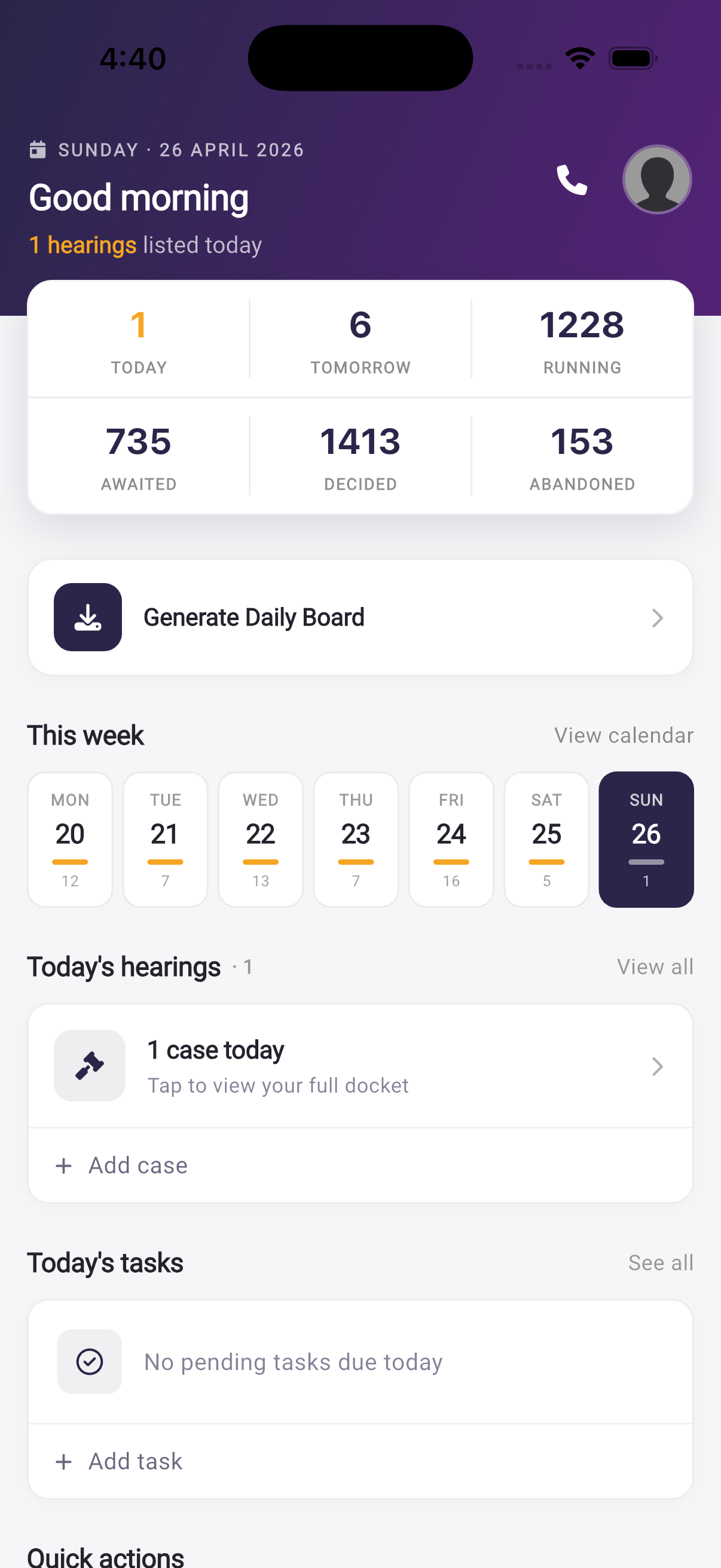
The Case Bench dashboard gives you a live overview of your entire practice
Case Management: Every Court, One App
Adding a case in Case Bench takes under a minute — and for District Court cases, it often takes under ten seconds. Here is what the platform supports:
- District & Taluka Courts
- High Courts (all India)
- Supreme Court of India
- DRT — Debt Recovery Tribunal
- NCDRC — Consumer Forum
- Revenue Courts
One-Tap Import from eCourts
The fastest way to add cases is the eCourts import. Enter a CNR number and Case Bench queries the eCourts database directly, auto-filling every field: both parties, case type, court name, judge name, acts and sections, FIR number, police station, and next hearing date. You just confirm and save. No manual typing whatsoever.
If you do not have the CNR, you can search by Case Number, Party Name, or FIR Number. For bulk import when setting up for the first time, download your case list as a TXT file from ecourts.gov.in and upload it directly — Case Bench creates all your cases at once.
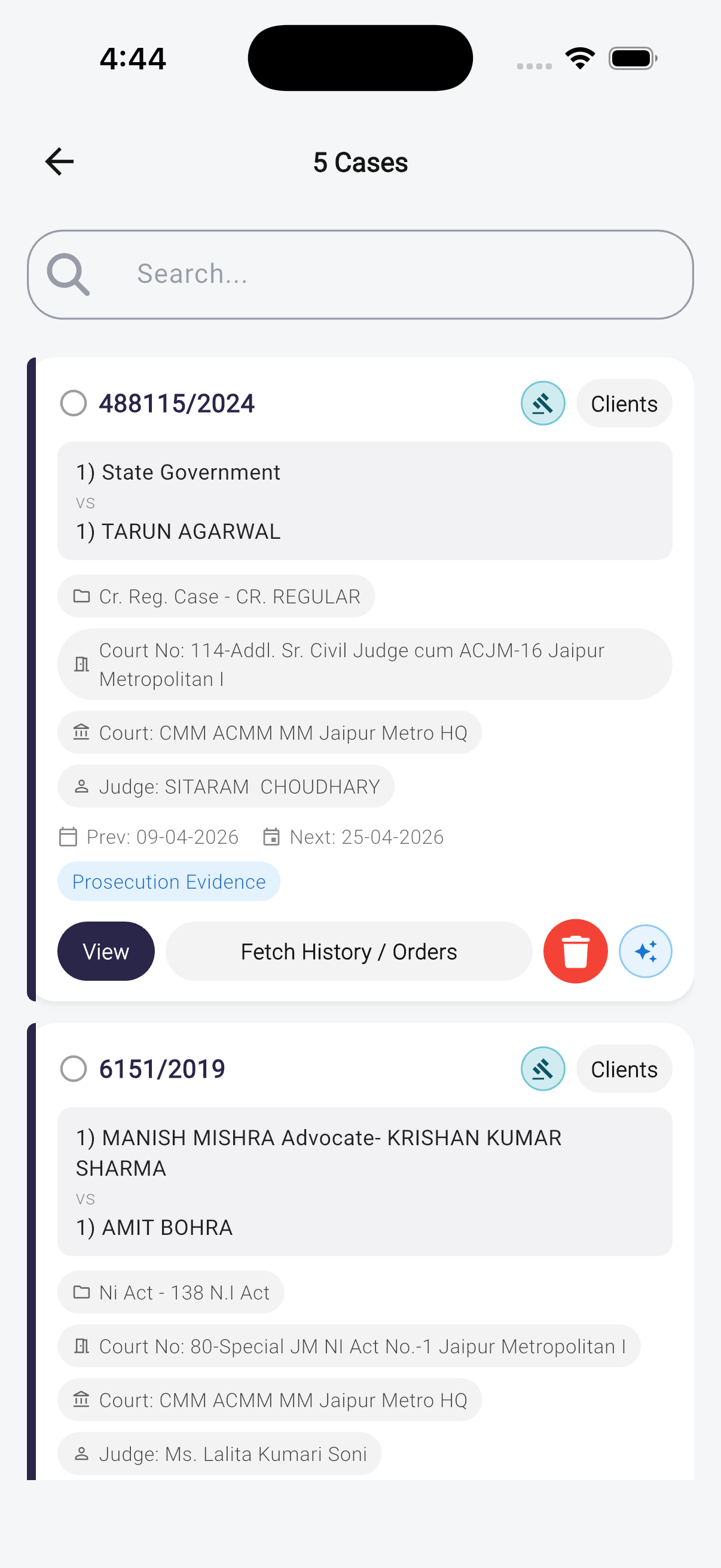
Every case detail — parties, court, judge, hearing date, acts and sections — organised in one place
Case Timeline & Order History
Every case maintains a complete timeline of proceedings. You can see how the matter has progressed from its first date to the present, which is invaluable when briefing a senior or handing over a matter. Court orders, roznama entries from eCourts, and your own notes all appear in chronological order.
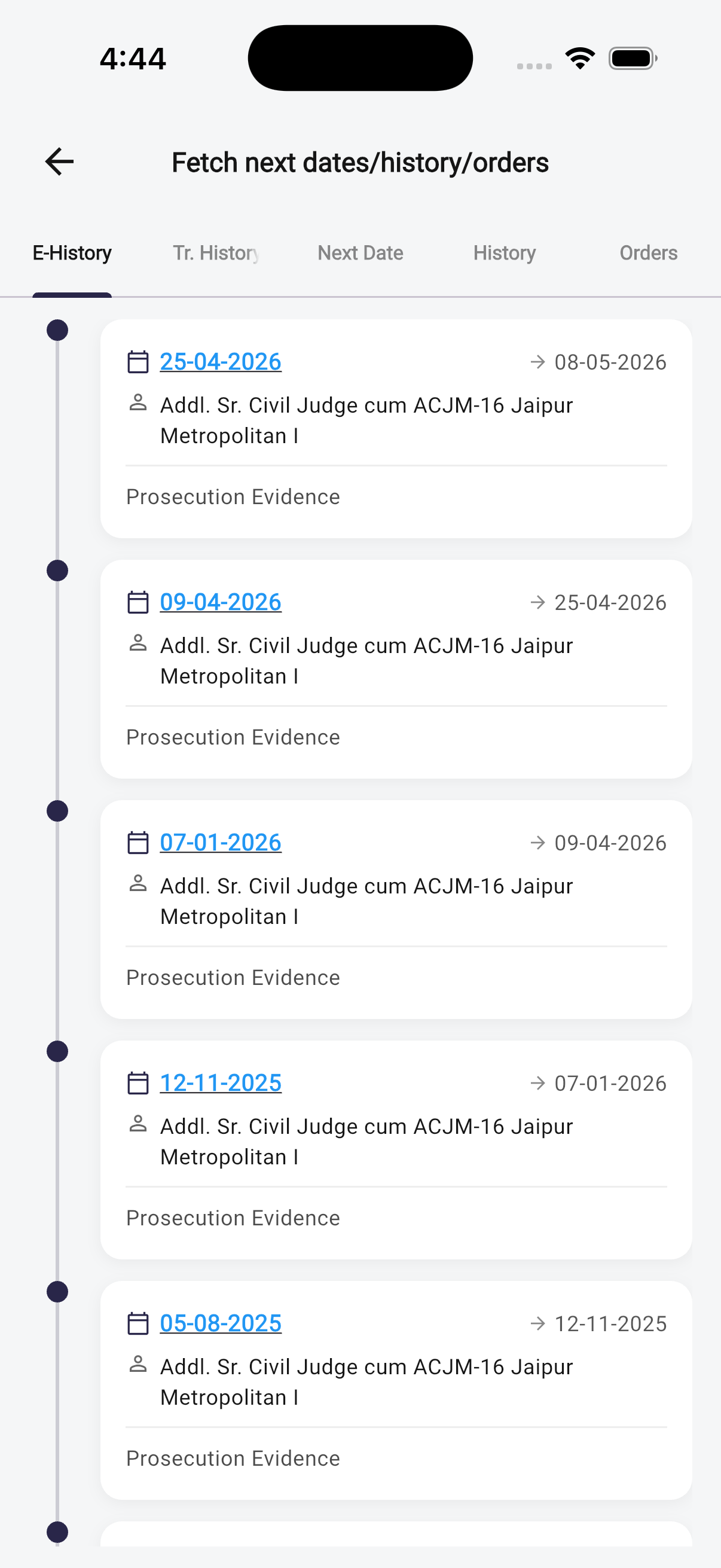
The case timeline tracks every hearing date, order, and note in sequence
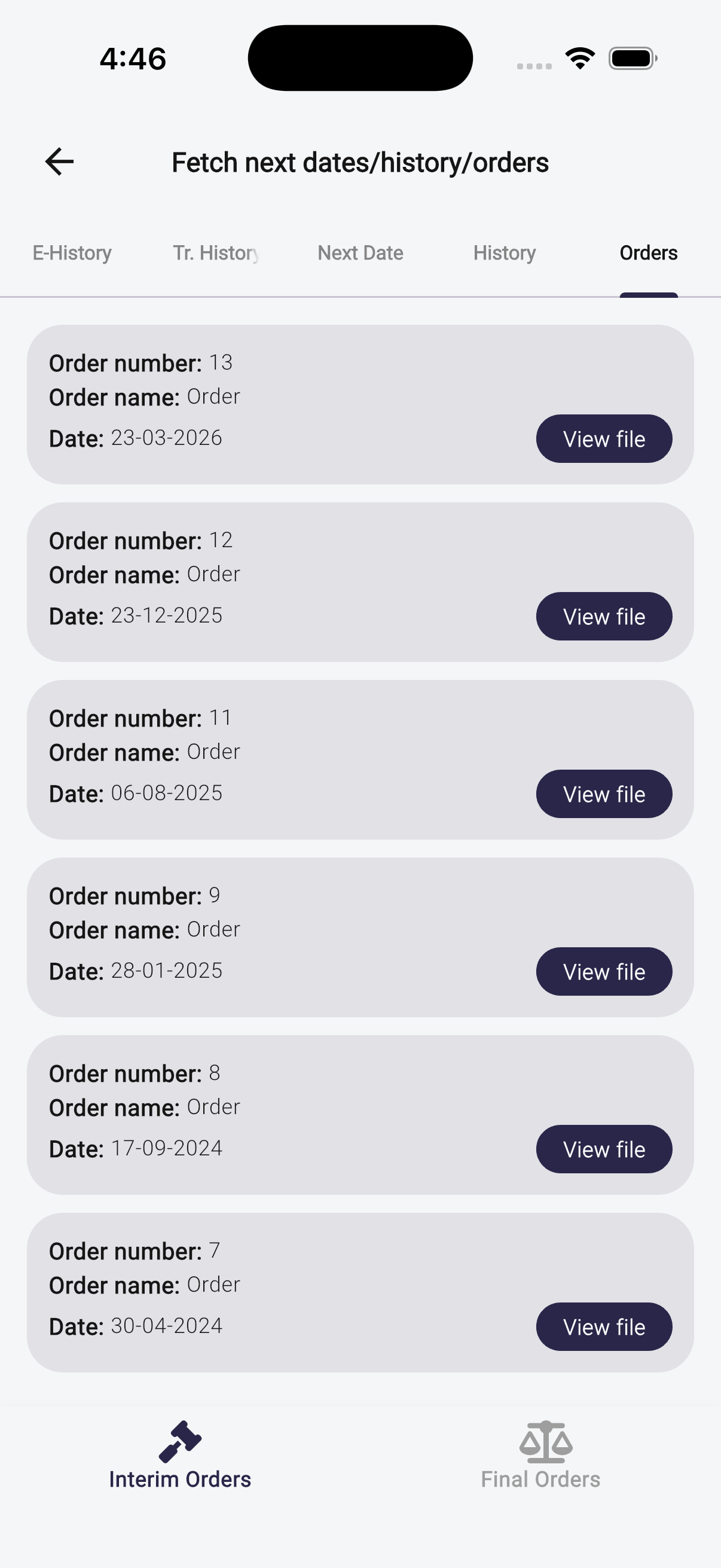
Court orders are stored directly against each case and accessible from any device
Cause List on WhatsApp — Never Miss a Hearing
This is the feature that advocates love most. Every day, before your hearings begin, Case Bench automatically sends your cause list directly to your WhatsApp. The message includes every case you have listed that day — with the case name, court, hearing purpose, and any notes recorded from the last hearing.
You do not need to open the app. You do not need to log in. The cause list arrives on your phone, in WhatsApp, exactly like a message from a colleague briefing you for the day.
WhatsApp has a 98% open rate in India. Email can wait; WhatsApp does not. Cause list notifications via WhatsApp ensure the right information reaches every advocate on your team, immediately, regardless of whether they open the app.
The same WhatsApp notification system works for your clients. When a hearing is approaching, Case Bench sends an automated reminder to your client — reducing the flood of "kya hua" calls that consume an advocate's afternoons.
Calendar: Your Full Schedule, at Every Level
The Case Bench calendar shows every hearing across all your cases, plotted on a monthly view. Navigate between months, tap any date to see that day's cases, and use colour-coding to instantly distinguish case types or courts at a glance.
Case Bench supports 16 preset colours (Navy, Blue, Teal, Green, Red, Orange, Purple, and more) plus custom colours. You can define rules — for example, "highlight everything fixed for Arguments in red" — and the calendar applies them automatically. Court holidays are also marked, so you are never caught planning around a non-working day.
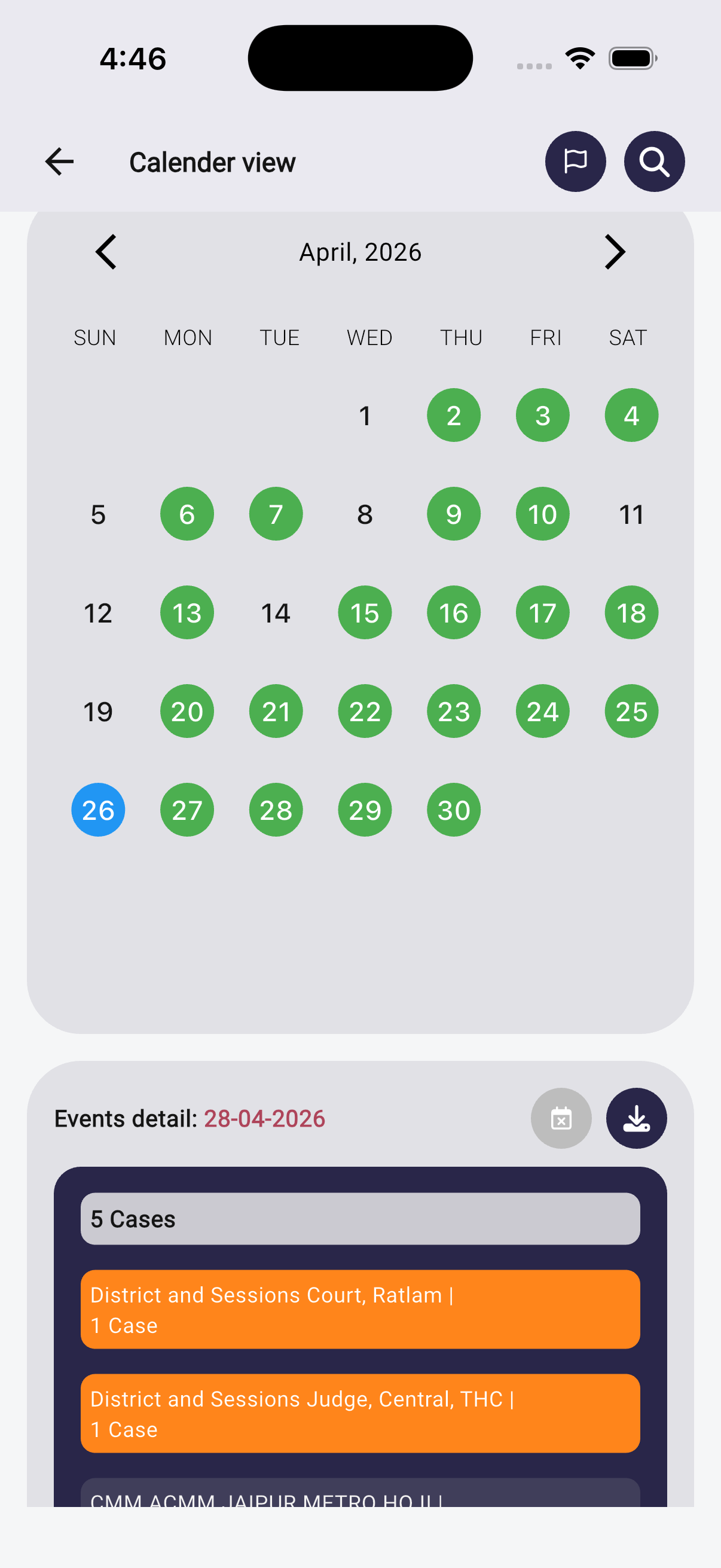
The calendar gives a complete picture of your hearing schedule — colour-coded, court holiday-aware
Daily Board: Print-Ready in One Tap
Every advocate who carries a printed cause list to court will immediately appreciate the Daily Board feature. Navigate to any date on the calendar, tap Generate Daily Board, and Case Bench produces a professionally formatted PDF with every case listed for that day.
Before generating, you can filter the board by court (useful if you practise in multiple courts) or by hearing type (Arguments, Evidence, Orders, etc.). The PDF can be downloaded, printed, or shared directly from your phone.
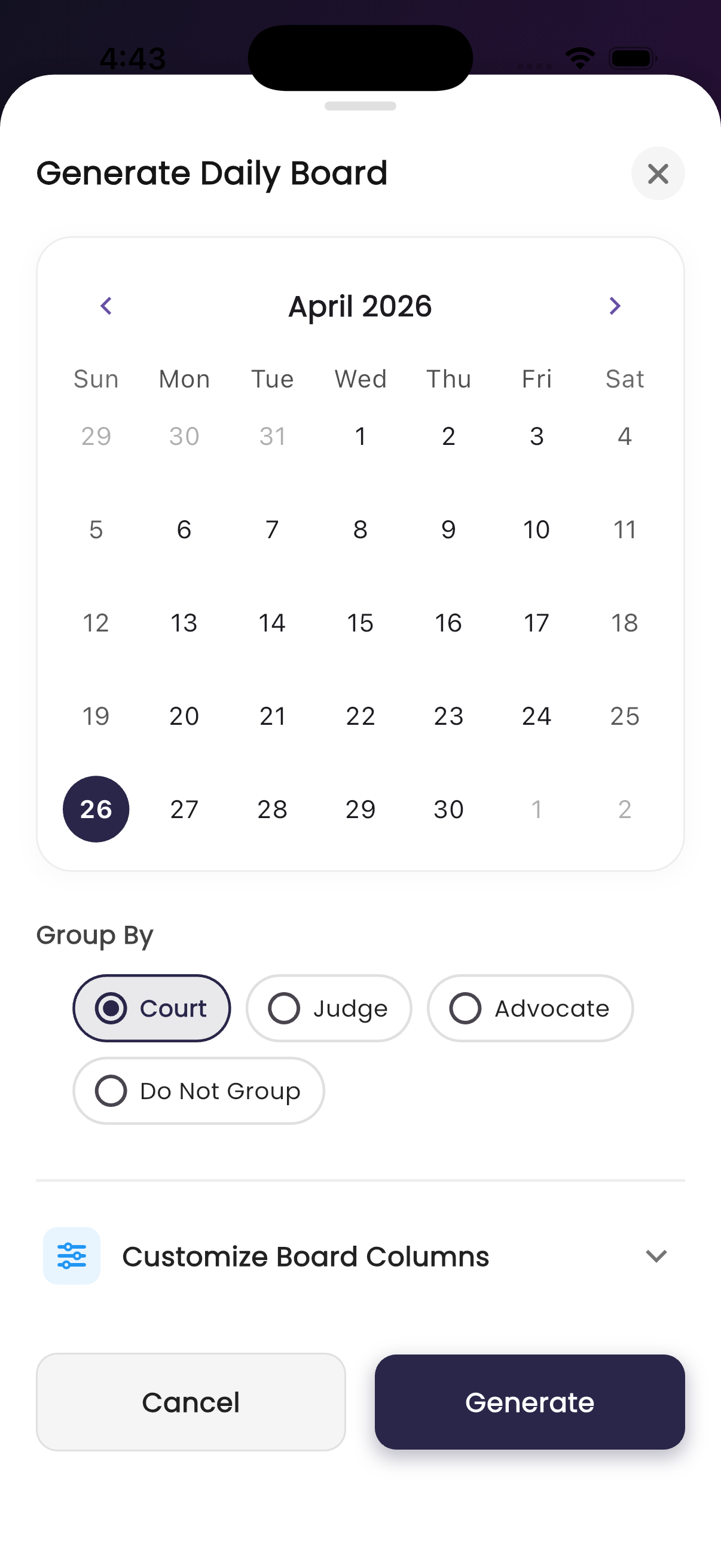
The Daily Board generates a court-ready PDF listing every case for the selected date
Document Management: Your Entire Case File, Always Accessible
Case Bench allows you to attach documents directly to each case — charge sheets, bail orders, court orders, drafted replies, any file. Upload using your phone camera (photograph a physical document) or choose a file from your device storage.
Every document is stored securely in the cloud and accessible from any device — whether you are at your desk, in court, or at a client's office. Your junior sitting at the office can pull up an order you filed three years ago while you are arguing in court. No more calling the office to locate a document.
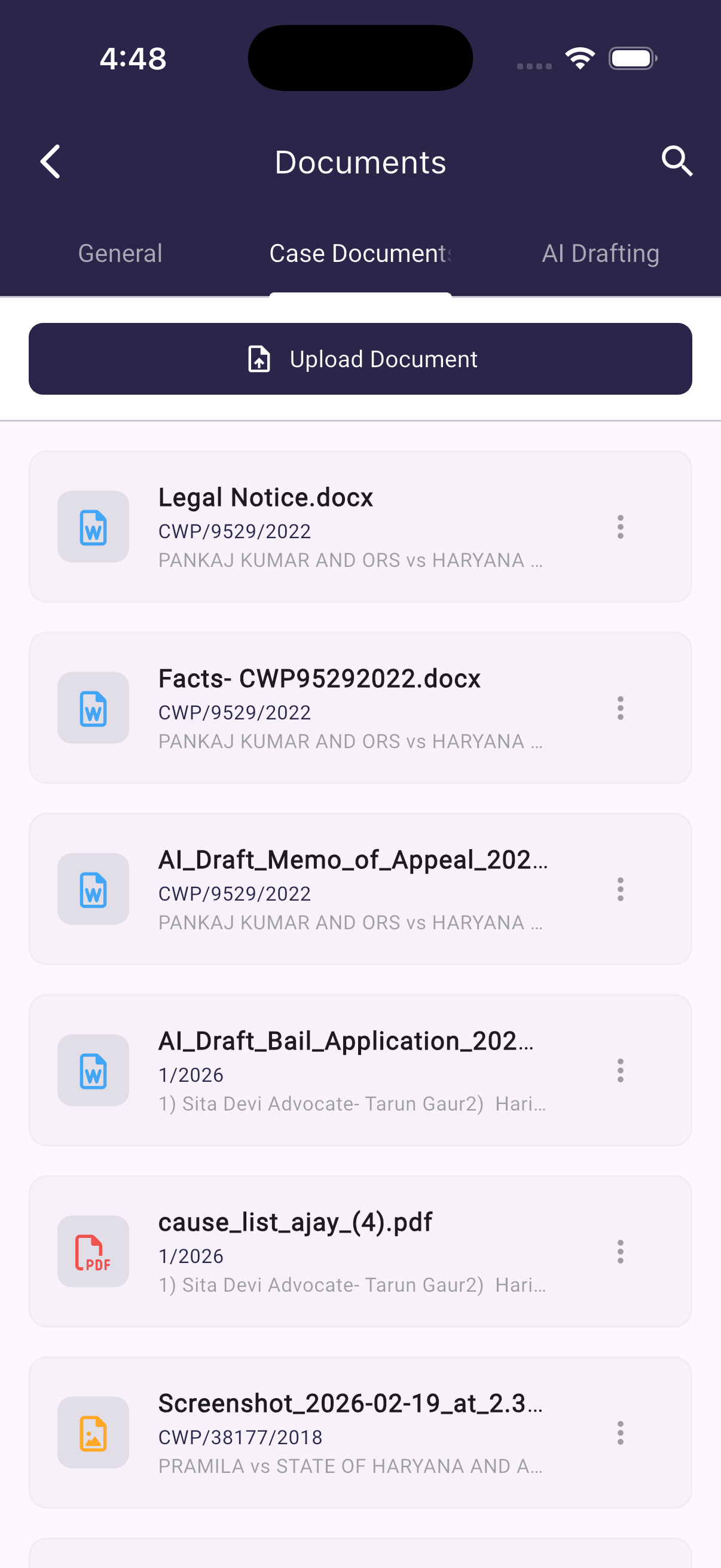
All case documents — orders, pleadings, photos — stored and accessible from anywhere
Invoicing & Fee Tracking: Built for Advocates
Sending fee invoices is something most advocates do by hand — or not at all. Case Bench has a built-in invoice generator that produces professional PDF invoices in seconds.
Open a client's fee record, tap Generate Invoice, and the invoice dialog opens with client details already filled in. Add line items to break down the fee — consultation, filing charges, court fee, drafting fee — set the invoice date, and generate. The PDF is ready to download and share directly with your client.
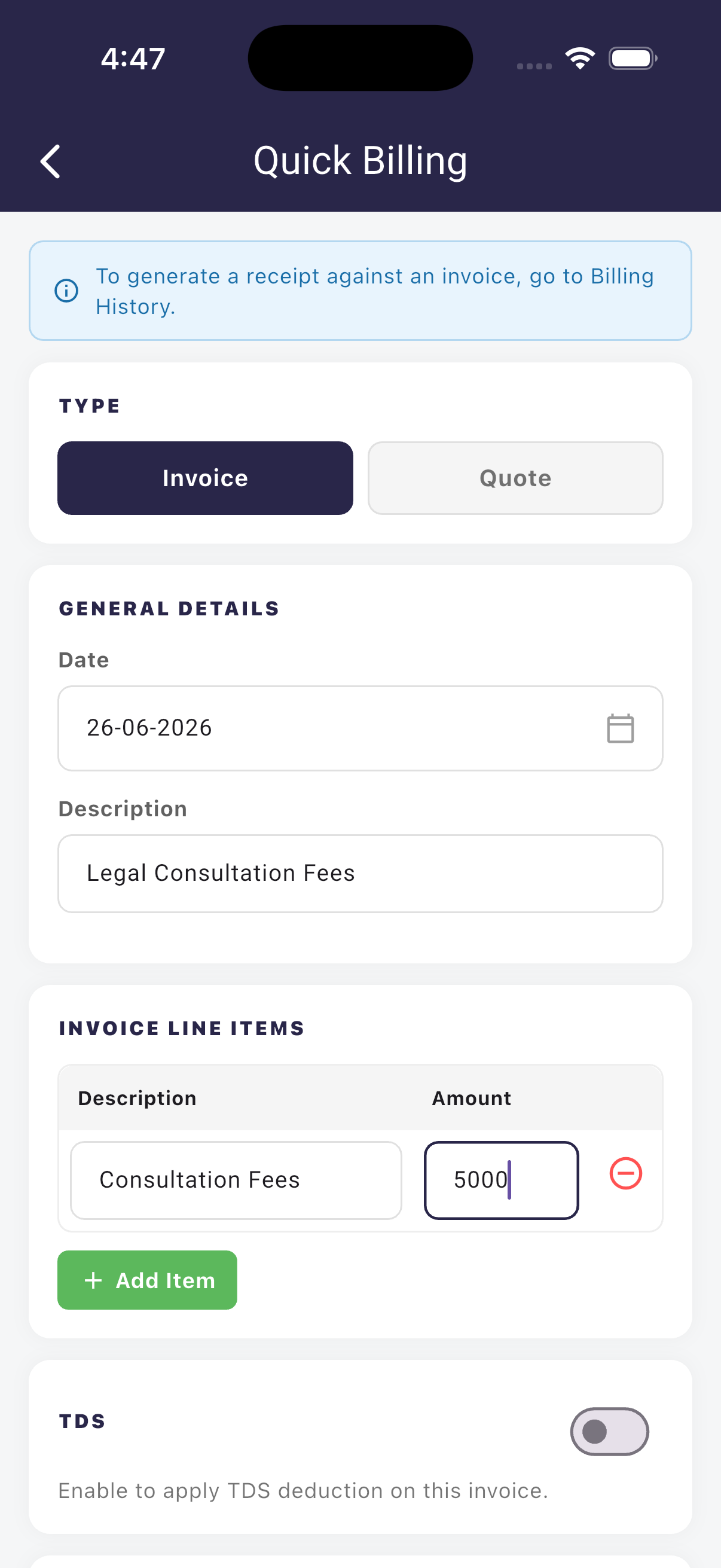
Generate professional fee invoices with line-item breakdowns — ready to share in seconds
The financial tracking module lets you record every fee transaction against a client — amount received, date, and mode of payment. Over time, this builds a complete payment history for each client, making it easy to track outstanding dues without maintaining a separate register.
Client Management & Client Portal
Case Bench maintains a centralised directory of all your clients. Each client profile stores their name, mobile number, email, and address. Clients can be linked to one or more cases, and from a client's profile you can navigate directly to all their pending matters.
Import clients directly from your phone's contact list — no manual typing. Once a client is in the system, linking them to any case is a simple search-and-select.
For clients who want visibility into their own cases, Case Bench includes a dedicated Client Portal — a read-only view that lets clients see the current status of their case, the next hearing date, and any notes their advocate has shared. Clients access it through a secure link, without needing to call or WhatsApp you for a status update.
Task Management & Reminders
Beyond hearing dates, legal practice runs on tasks — "File the reply by Friday", "Call the client about settlement", "Draft the bail application". Case Bench's task system lets you create tasks with priority levels (Low, Medium, High), due dates, and assignees. Each task can be linked to a specific case and client.
Task comments keep communication in one place. Instead of separate WhatsApp threads for each matter, your team's questions and updates appear on the task itself.
Reminders complement tasks for time-sensitive matters. Set a reminder at a specific date and time — daily, weekly, or monthly — and Case Bench delivers the notification exactly when you need it. Recurring reminders are useful for things like quarterly filings, statute of limitations deadlines, or periodic client check-ins.
Team Management with Role-Based Access
Case Bench is built for law firms and chambers, not just solo practitioners. Add junior advocates and team members to your account, and control precisely what each person can see and do with granular permissions:
- Add Case — whether the junior can create new cases
- Modify Case — whether they can edit case details and hearing dates
- View Only Assigned Cases — restricts the junior to only the cases assigned to them, not your full case list
- View Case Fees — controls whether financial information is visible
You can assign specific cases to specific advocates, giving each team member a focused view of their own workload without exposing the full portfolio.
Advanced Search & Filtering
With hundreds of cases in the system, search is essential. Case Bench's advanced search supports every meaningful field — Case Number, CNR, First Party, Opposite Party, Court, Reference Number, Police Station, Under Section, and more. All fields support autocomplete, so you find what you are looking for in two or three characters.
Search results can be filtered by date range (past hearings or upcoming), by case status (decided, abandoned, awaited), or by month. Switch to the court-wise grouped view to see how your portfolio is distributed across different courts.
Who Is Case Bench For?
- Solo advocates managing 50–300 cases across district courts and high courts
- Law firms and chambers with multiple advocates who need shared access and role-based control
- In-house legal teams at corporates and government departments tracking litigation across courts and tribunals
- Any advocate who is tired of maintaining case diaries, registers, and spreadsheets by hand
Getting Started
Case Bench is available on web at casebench.in and as a native app on Android and iOS. New accounts start with a free trial giving full access to all features — no credit card required.
The fastest way to get started: sign up, use the eCourts bulk import to bring all your existing cases in at once, and your practice is organised from day one.
Ready to modernise your case management?
Join thousands of legal professionals who use Case Bench to never miss a hearing.
Get Started Free